ACE COMBAT 8 Parts and Loadouts: How the Hangar Systems Fit Together
How ACE COMBAT 8’s hangar fits together: aircraft choice, two special weapon slots, wingmen equipment, parts and a 60-second pre-mission checklist.
FAQ
What does SELECT PARTS do in ACE COMBAT 8?
Can I change my wingmen's aircraft?
Can I change loadout mid-mission?
Does the whole flight share one aircraft type?
One screen, four decisions
The standby screen is the strategic layer of ACE COMBAT 8. In older entries you picked a plane and one special weapon; here the same screen stacks four decisions — your airframe, two special weapon slots, your wingmen’s aircraft and their equipment, plus parts. The official screenshots show the menu over a live hangar deck, with the flight parked in staggered formation behind the UI.
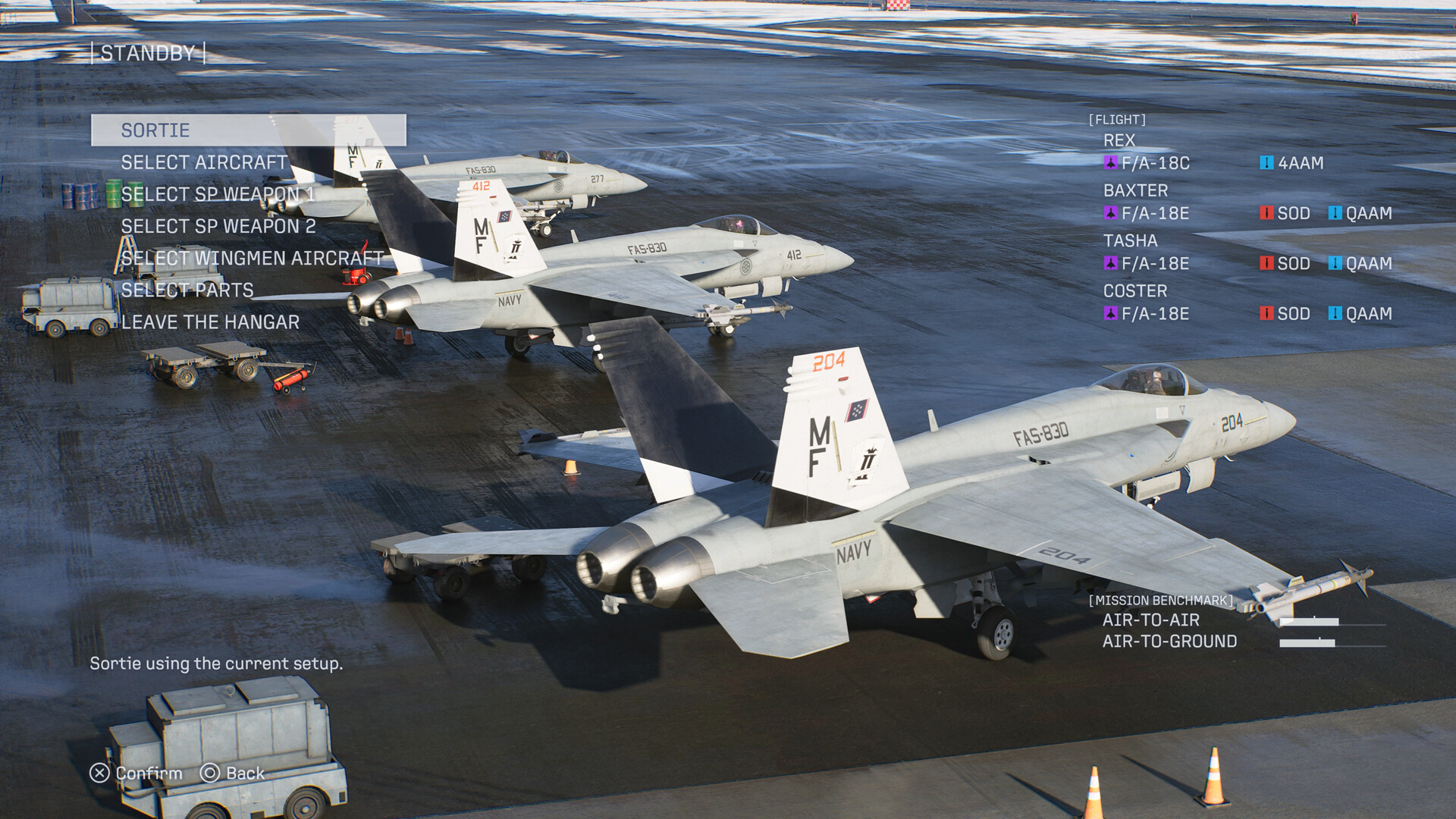
Aircraft choice: role first, looks second
Your aircraft decides speed, handling and available weapons. The launch lineup exceeds 30 airframes in four classes, and confirmed types already span the classic triangle: multirole workhorses like the F/A-18C and F/A-18E, heavy interceptors like the F-14D, and nimble types like the F-2A. The full breakdown lives in the aircraft list, and the starting aircraft guide narrows it down for your first campaign hours.
Two rules hold from official material alone:
- Match the benchmark. The standby screen rates air-to-air and air-to-ground emphasis. A fighter with two multi-lock slots wastes half its kit on a ground-pounding mission.
- Let the second slot specialize. With two SP weapon rows, your airframe choice no longer forces an all-air or all-ground build — pick the airframe for flying characteristics, then split weapons across both slots (see the special weapons guide).
Wingmen are part of your loadout
SELECT WINGMEN AIRCRAFT is the quiet star of the menu. Your three-flight companions each take their own airframe and special weapons into the sortie. One official screenshot shows the flight roster with REX on an F/A-18C (4AAM), BAXTER on an F/A-18C (4AAM, LASM), TASHA on an F-2A (LASM, HVAA) and COSTER on an F-14D (LAAM, GPB) — a deliberate spread of anti-air and anti-surface coverage.
Two known systems interact here. First, the campaign’s story treats these pilots as people whose survival matters, and series tradition lets your choices affect whether wingmen make it home. Second, in-mission commands exist: screenshots show an SP WEAPON DISPERSE/ATTACK toggle and a “Dispersed Attack” radio call that sends the flight’s special weapons across multiple targets simultaneously. Equipping your wingmen with complementary weapons is what makes those orders effective — the aces and wingmen guide goes deeper.
Parts: confirmed, not yet catalogued
SELECT PARTS appears in the sortie menu, which confirms an equipment layer that persists across the hangar systems. What official material does not show is the part catalogue — names, effects and limits are launch-week verification. Expect the usual shape for the series: small percentage adjustments rather than build-defining perks, applied per sortie rather than per campaign.
This wiki will not guess at part names or effects. When the game launches on October 1-2, 2026, this section gets replaced with a tested table.
A 60-second pre-mission checklist
- Read the benchmark: air-to-air, air-to-ground, or mixed.
- Pick the airframe whose handling suits that split.
- Fill SP weapon slot 1 for the primary threat, slot 2 for the secondary (multi-lock for drone swarms, precision for structures, anti-ship for vessels).
- Spread coverage across the flight: at least one wingman anti-air, one anti-ground.
- Adjust parts if the benchmark highlights a specific threat type.
- Sortie.
The score you earn with that loadout is counted by the systems in the score and ranking guide.
Related Articles
aircraft
ACE COMBAT 8 Aircraft List: Every Confirmed Plane at Launch
Every aircraft confirmed for ACE COMBAT 8 at launch: 30+ airframes in four classes, from the F/A-18C and F-14D to the pre-order F-14A and the Morgan.
aircraft
Best Starting Aircraft in ACE COMBAT 8: What to Fly First
Which aircraft to fly first in ACE COMBAT 8: the confirmed opening hangar — F/A-18C, F/A-18E, F-2A, F-14D — matched to mission benchmarks.
guides
ACE COMBAT 8 Beginner Guide: Sortie Prep, Controls and First Missions
New-pilot briefing for ACE COMBAT 8: how the sortie menu works, SP weapons and parts, the mission benchmark and what to expect from the campaign.
Was this helpful?
Thanks for the feedback!